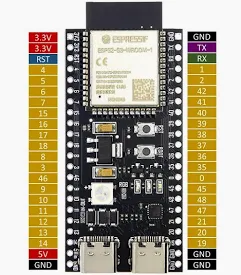
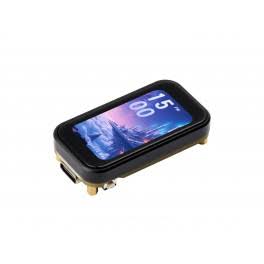
MAR ver 2.1 for the standard dev board. MAR Color ver 2.1 for the Waveshare color board. Both bring cross-band forwarding and configurable automatic replies to your Meshtastic setup. Choose your board below, then select its firmware.
WHAT MAR DOES
Two useful tools for your mesh
Cross-band forwarding
Connect two Meshtastic radios and forward decoded messages on matching channel slots. Configure matching channel keys, then enable the slots you want MAR to bridge.
Supports slots 0–7. Direct messages, MQTT traffic and reactions are not forwarded. Supported position, node-info and telemetry beacons are sent as labeled text summaries.
Automatic command replies
Set up a command and choose its action in the MAR dashboard. When MAR receives an enabled command, it runs that action and sends the response over the mesh. For example, !status can return live node status.
Example commands start disabled. Enable the commands and actions you want to use.
STANDARD DEV BOARD
MAR ver 2.1
an ESP32-S3 N16R8 dev board with 16 MB flash and 8 MB OPI PSRAM (optional SSD1306 OLED)
2.1 · Wi-Fi reliability update
Wi-Fi sleep removed. Earlier Wi-Fi connection behavior restored; other 2.1 features retained.
Weather lookup progress and responsive location saving.
Collapsible commands and cross-band settings; Enable all / Disable all.
All eight channel slots (0–7), optional cross-band beacon summaries, and PROTO traceroute.
Radio preset reference lists, optional portal login, brightness and timeout.
Timezone, 12/24-hour time, and corrected mA display.
Private messages stay private. Cross-band beacons are supported text summaries. Traceroute depends on node support. MAR Color connectivity confirmed after rollback. Standard dev-board build compiled; hardware testing pending.
Private messages stay private. Cross-band beacons are supported text summaries. Traceroute depends on node support. Firmware and LED software tests passed. Physical sleep/wake validation is pending.
Get the current source code to study, build on, or adapt for your project. Each archive matches the corresponding firmware release above and includes its build configuration, documentation, tests, and license notices.
STANDARD DEV BOARD
MAR 2.1
For the ESP32-S3 N16R8 board with optional SSD1306 OLED.
MAR is licensed under GNU GPL v3. Keep the included license, copyright, and third-party notices with modified redistributions.
SIMPLE STEPS
Update or start fresh
Use desktop Chrome or Edge and a USB data cable. Close other serial tools. Connect one MAR at a time. Keep USB connected while flashing.
Update — keep settings
Choose your board’s firmware above.
Connect USB, check the board confirmation and click Connect & identify. Select MAR’s COM port.
Click Flash update — keep settings and confirm.
Wait for verification. Press RESET if needed, then open your MAR dashboard and review Device settings.
Updates require a recognized MAR build for the same board and partition layout. Both application slots are replaced; saved-data areas are checked unchanged. If rejected, nothing is written. Older 2.0 portals may reject 2.1 filenames—use this USB updater. Never rename the other board’s image.
Full flash — erase settings
Choose your board’s firmware, connect USB and click Connect & identify.
Check the full-erase box and click Full flash — erase settings.
Wait for verification, then press RESET if needed. Allow a few seconds to start.
Join MeshAutoResponder-Setup with ESP32MESH. Open http://192.168.4.1/wifi to set Wi-Fi, or http://192.168.4.1/ for the dashboard.
Full flash removes saved Wi-Fi, commands and settings. Use it for a fresh install or a deliberate clean reset.
Can’t find the port or setup Wi-Fi?
Hold BOOT, tap RESET, then release BOOT. Reconnect using the boot-mode COM port, which may be different. After flashing, press RESET normally.
In 2.1, press BOOT to open setup Wi-Fi and wake the screen. Wi-Fi stays enabled. BOOT opens the setup hotspot when needed. The dashboard needs no login by default; the hotspot password is still ESP32MESH. If you enable dashboard login, a fresh installation uses admin / ESP32MESH; an update retains your saved password. MAR 1.1.1 still requires its dashboard login.
The browser identifies the ESP32-S3 and flash size, but cannot verify LCD wiring or PSRAM. Select the matching board pane.